

 |
| Internal Linking and SEO |
Have you ever wondered how some websites rank higher than others on Google? How do they manage to get more traffic, leads, and conversions? Well, there are many factors that affect SEO, but one of the most overlooked and underrated ones is internal linking.
Internal linking is the practice of linking your own pages to each other within your website. It helps you create a better user experience, a stronger site structure, and a more powerful online presence. In this article, we will show you how internal linking can boost your SEO performance and give you some practical tips on how to do it right.
Ready to learn the secrets of internal linking? Then keep reading and discover how to take your website to the next level!
How internal linking helps with SEO
Internal linking is not only a good practice for your website design, but also a powerful tool for your SEO strategy. Here are some of the ways internal linking helps with SEO:
It improves crawlability, indexability, and usability of your website.
Internal links help search engines discover and index new pages on your website. They also help users navigate your website and find relevant content easily. According to Google, "a well-structured website with clear and logical links between pages is essential for both usability and SEO." For example, look at how Wikipedia uses internal links to connect related topics and provide more information to the readers.

It boosts relevance, authority, and ranking signals for your pages.
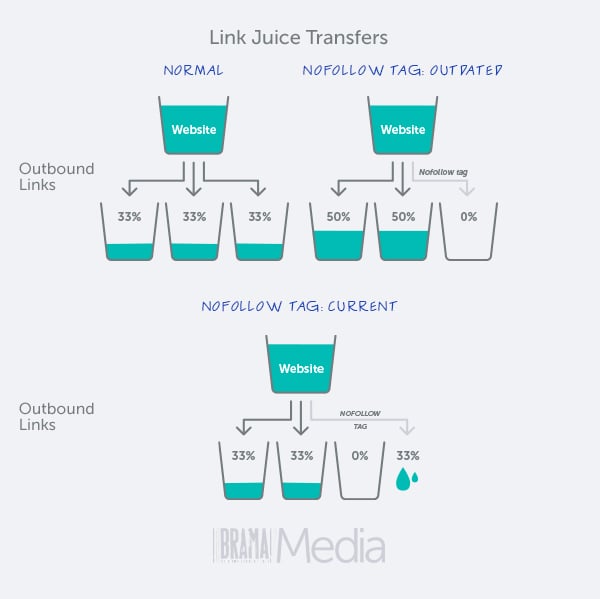
Internal links help search engines understand the topic and context of your pages. They also help distribute link equity and PageRank across your website. According to Moz, "internal links are most useful for establishing site architecture and spreading link equity." For example, look at how Amazon uses internal links to show related products and categories and increase the chances of conversions.

It reduces bounce rate, increases dwell time, and enhances user experience.
Internal links encourage users to stay longer on your website and explore more content. They also provide additional value and information to your readers. According to HubSpot, "internal links can increase the time visitors spend on your site by 40%." For example, look at how Neil Patel uses internal links to offer more resources and guides to his readers and keep them engaged.
As you can see, internal linking has many benefits for SEO. But how do you implement internal linking effectively? In the next section, we will share some examples of internal linking strategies and best practices that you can use for your own website.
How to Create a Clear and Logical Site Structure with Internal Links
The first step to creating effective internal links is to have a clear and logical site structure. A site structure is the way you organize your pages and content into categories and subcategories. It helps users find what they are looking for and understand the purpose and scope of your website. It also helps search engines understand the hierarchy and relationships between your pages and assign them the appropriate authority and relevance.
To create a clear and logical site structure, you should follow these principles:
- Use a simple and intuitive navigation menu that covers the main topics and pages of your website.
- Use breadcrumbs to show users where they are on your website and how to go back to previous pages.
- Use a sitemap to list all the pages of your website and submit it to search engines.
- Use a consistent and descriptive URL structure that reflects the site structure and the content of each page.
- Use internal links to connect related pages and guide users through your content.
Here is an example of a clear and logical site structure for a blog about digital marketing:

As you can see, the site structure is organized into three main categories: SEO, Content Marketing, and Social Media Marketing. Each category has several subcategories that cover specific topics within the main category. Each subcategory has several blog posts that provide valuable information and tips on the topic. And each blog post has internal links that connect it to other relevant blog posts within the same or different subcategories.
This site structure makes it easy for users to navigate the website, find the content they are interested in, and explore more content on related topics. It also makes it easy for search engines to crawl and index the website, understand the importance and relevance of each page, and rank them accordingly.
Conclusion
Internal linking is a powerful SEO technique that can help you improve your site structure, user experience, and rankings. By following the best practices we discussed in this blog post, you can create effective internal links that connect your pages and content in a clear and logical way. You can also optimize your internal links with anchor text, keywords, and context to make them more relevant and valuable for both users and search engines. And you can balance the number, quality, and diversity of your internal links to avoid over-optimization and spamming.
Now that you know how to create and optimize your internal links, it's time to take action and apply these tips to your own website. You can use tools like Screaming Frog, Ahrefs, or Moz to audit your existing internal links and identify any issues or opportunities for improvement. You can also use tools like Yoast SEO or Rank Math to help you create and manage your internal links on WordPress.
Internal linking is not a one-time task, but an ongoing process that requires regular maintenance and updates. As you add new content or update existing content, you should always look for ways to link it to other relevant pages on your website. This will help you keep your site structure fresh and dynamic, and your users and search engines happy.
We hope you enjoyed this blog post and learned something new about internal linking. If you have any questions or comments, feel free to leave them below. We would love to hear from you!
And remember: a link is worth a thousand words. So make sure you use them wisely!

